






Archelios Pro Silver PV software can manage projects up to 100kWp
Trace Software International is excited to announce the launch of the newest editions of archelios™ Pro. The software is an excellent tool for the feasibility and bankability study, simulation, 3D design, and sizing of any photovoltaic project.
As the solar market becomes more and more complex and challenging, the company has launched a new PV software offering. Trace Software International has used its expertise to create four different PV tools’ proposals, archelios™ Pro Free, archelios™ Pro Silver, archelios™ Pro Gold and archelios™ Pro Platinum. All of them aimed at delivering more value and satisfying the needs of a wide range of professionals roles within the solar industry. Each product line is adapted to the size of the PV project and comes with features and benefits tailored to the specific requirement of the activity.
archelios™ Pro Silver
archelios™ Pro Silver is a professional tool for the design, calculation, and simulation of your PV project up to 100 kWp.
It includes a set of unique features and benefits that deliver greater value in terms of detail, quality, customization, and economical asset.
Privacy and easy access
The software ensures easy and secure access to the web application. The registration process is very simple as it consists of creating login credentials ( company name, user name, email address, and password). All the personal information will be kept strictly confidential as envisaged in the General Data Protection Regulation (GDPR).
Collaborative workflow for enhanced productivity
The complexity of solar projects requires a high level of coordination of documents, processes, and responsibilities among all operators. Thanks to the automatic saving of and a .a3d file when creating the project, all the relevant stakeholders will work on a single model, ensuring the uniformity and the consistency of all the data as well as better management of information and an improvement on the productivity.
<h3″>Bankability of the PV project
Solar bankability studies are essential to evaluate the economic viability and profitability of any PV project, give assurance to decision-makers, and guarantee the optimal ROI. archelios™ Pro provides economical and financial indicators and editable reports that support the decision-making process. Users can pass to the next step of the photovoltaic project with total peace of mind.
Economic assessment for he energy output of the PV modules
The user can import the hourly rate profile of the PV installation, including the electricity feed-in tariffs, hour by hour, over the year. Besides, archelios™ Pro estimates the price of each self-consumed kWh. More reliable data allow rigorous predictions.
Accurate solar generation forecast
To predict the generation of electricity by a solar power plant, it is necessary to take into consideration the solar radiation, ambient temperature, weather, and the geographic location of the PV panel. The user can rely on METEONORM, a powerful database providing data about the solar radiation for a certain geographical site and Google Maps providing the automatic calculation of the far mask (natural relief) and the evaluation of the data from the near mask (close modules). The user can count on reliable data regarding the weather forecast, the solar potential, and the environmental parameters.
Easy location management
Fully responsive, this option makes it possible to locate a site on Google Maps by entering an address in a search box. The user can access a large verified database.
Indication of the optimal orientation and inclination/tilt of the PV Array
The performance of photovoltaic panels is influenced by their orientation and tilt (inclination), which affects the amount of producible energy. The software assists the user in the analysis process by indicating the optimal orientation and tilt of the PV array. In this way, it is possible to optimize the amount of electricity that can be supplied for each site.
Calculation of the solar radiation on a tilted solar panel
The software enables the user to calculate the expected solar production on a tilted solar panel. This option allows the user to select the best site related option and the optimal configuration for the PV array to avoid losses in energy production.
Proper sizing of the electrical components of the PV installation
Maximum safety is guaranteed as the software is provided with advanced functionalities that assist the user in the dimensioning and sizing of the inverters and the PV modules. The user can make more reliable choices in the selection of the electrical equipment, in a quicker time. Besides, an extensive database of inverters references is included to enhance the project’s quality and level of detail.
Self-consumption operating mode for grid-connected system
archelios™ Pro Silver guarantees a detailed electrical analysis for the self-consumption operating mode. It is possible to establish the optimal design and sizing conditions based on the self-consumption term. The software features enable the user to save design time, enhance the performance, and empower the accuracy of the calculations to provide a project as close as possible to the production conditions. In detail, the user will benefit from:
- Greater flexibility and customization: The user can evaluate the most suitable self-consumption operating mode profile for the project as he can choose from a pre-entered database.
- Powerful calculations made easy: To maximize the net benefits, the calculations will be carried out on simulation-based methods. The user will be able to take into account the real annual consumption profile, or the monthly invoices and import only partial profiles.
- Peak power output calculation available: archelios™ Pro provides the user with an indication of the peak power required to achieve a selected self-generation rate. This can only mean better accuracy.
- Optimal sizing of the battery energy storage system: To reduce operational costs, the user can size the battery energy storage system according to the expected autonomy.
3D Model (Sketch-up plugin)
The software provides a geolocated 3D model that simulates the installation and each of its components, and the environment including shadows and near-masks. It includes a SketchUp plugin to recreate the structure or place where the installation will be designed by building a 3D digital model known as PV BIM, which increases the accuracy of the results because it takes into account every obstacle that may interfere with direct irradiation. Besides, the tool will deliver the automatic 3D calibration and cabling of the PV installations.
Solar pumping
The tool helps with the sizing of the PV array to determine the peak power required in m3/d. In addition, it will be possible to obtain a detailed simulation, based on the PV system details, pump characteristics, and storage size indicated by the user.
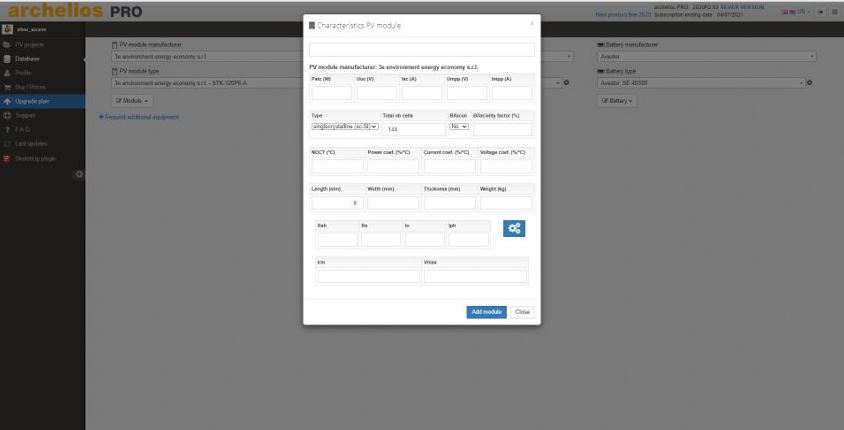
Customisation of the modules and inverters database
It is possible to add modules and inverters’ references to the customizable database. By relying on a rich variety of selection, the user will be able to deliver a better level of quality and detail to the PV project, according to the customer’s specifications. It is also possible to memorize the configurations and reuse them according to the projects’ needs.
Coloured 2D/3D view of the plant
A coloured 2D/3D view of the plant highlight all the project’s components such as the irradiation of the PV modules, strings, junction box, or inverters. It is easier for the user to acknowledge every single detail of the PV project just in a glance.
Automatic and customisable device naming
This feature permits to identify the components of the PV project (inverters, MPPT, BJ, strings, …), that can be clearly marked on the wiring diagrams. The project execution is smoother and documents are easier to read. Besides, the risk of errors in devices is reduced.
3D automatic alignment
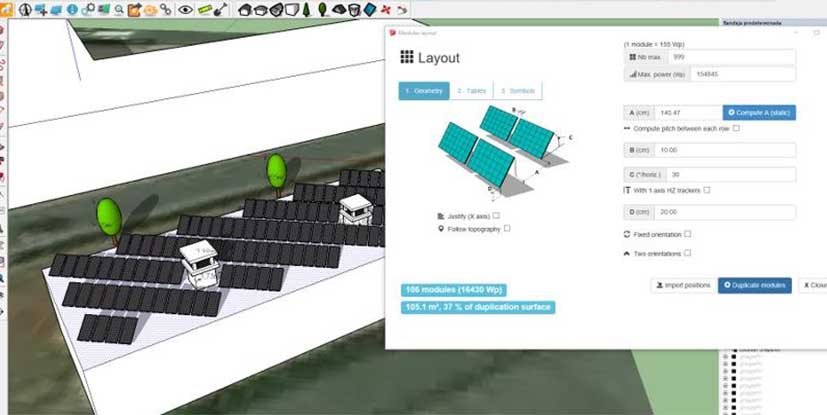
It is possible to obtain the automatic layout of the modules on a given surface and choose the parameters of spacing, orientation, inclination, the height of the modules as well as determine the module tables(X*Y).archelios™ Pro provides the automatic estimation of the minimum spaces required between the rows and permits to set the East-West panel’s layout option.
PDF and CSV reports of the PV project
It is possible to export the entire PV project files to both PDF and CSV formats, including the following multi-dimensional data: summaries, assumptions, cost details, quantification and costing of losses, images and infographics, and economic indicators. Users can also enjoy the complete and detailed report of the feasibility study of the photovoltaic project. From the installer point of view, the PDF report allows better and quicker visualization of the customer projects in all its details. Compact, secure, and convenient, the PDF report is an essential tool in the decision-making process for all the stakeholders.
BIM&Co modules database
BIM&Co modules database. archelios™’s 3D mock-up includes the physical and the electrical characteristics of the panel thanks to the connection to the BIM&CO’s extensive database. This ensures up to date materials.
Basic export of PV project to archelios™ Calc
User can export the PV project created in archelios™ Pro to archelios™ Calc, including the inverters, tracker, generator configuration of inverters and generators. This can only mean a quicker and more accurate design, as there is no need to re-enter data. Another source of errors eliminated.
Export the PV project to archelios™ O&M
Users can export the PV project created in archelios™ Pro to archelios™ O&M, the monitoring software for PV installations. This feature saves time and provides reliability as it reduces the data entry constraints at every stage of the PV project. Efficiency is increased.
Online project storage
Thanks to the cloud-based storage, the digital information of the PV project will be stored in a secure data centre the user can access at any time and from anywhere in the world. It is also possible to share files instantly and collaborate in real-time. The software will back up the data remotely and safely. It is compatible with all the web browsers and, apart from its ergonomics, it also allows access from any smartphone without sacrificing the screen quality. The storage capacity for each version is as follows: Silver 2GB, Gold 4GB, and Platinum 8 GB.